
Most guides to Click to WhatsApp Ads stop at "create the ad." That's the easy part. The hard part, the one that decides whether you make money, is knowing what happens after the click. This guide covers both: how to launch CTWA campaigns, and how to measure them so the algorithm optimizes toward qualified leads rather than empty conversation volume.
What are Click to WhatsApp Ads (CTWA)?
Click to WhatsApp Ads are Meta ads, running on Facebook and Instagram, that open a WhatsApp conversation instead of sending people to a landing page. Someone taps your ad and lands directly in a chat with your business, with no page in between.
That single difference matters more than it looks. Every extra step between an ad and a conversation costs you leads, and CTWA removes those steps so the path from ad to chat is a single tap.
Why CTWA works, especially in Latin America
In most of Latin America, WhatsApp is where buying decisions actually happen. People ask their questions and negotiate there the way other markets rely on email or web forms, and they expect a real reply, fast.

That changes the economics of advertising. A landing page asks a stranger to fill out a form and then wait for someone to follow up. A CTWA ad opens a real conversation in the channel your customer already trusts. Lower friction means cheaper conversations, and conversations are where high-ticket sales in auto, real estate, education, and B2B actually close.
The three campaign objectives, and which to pick
When you build a CTWA campaign, Meta lets you optimize for different outcomes. Three objectives are worth knowing:
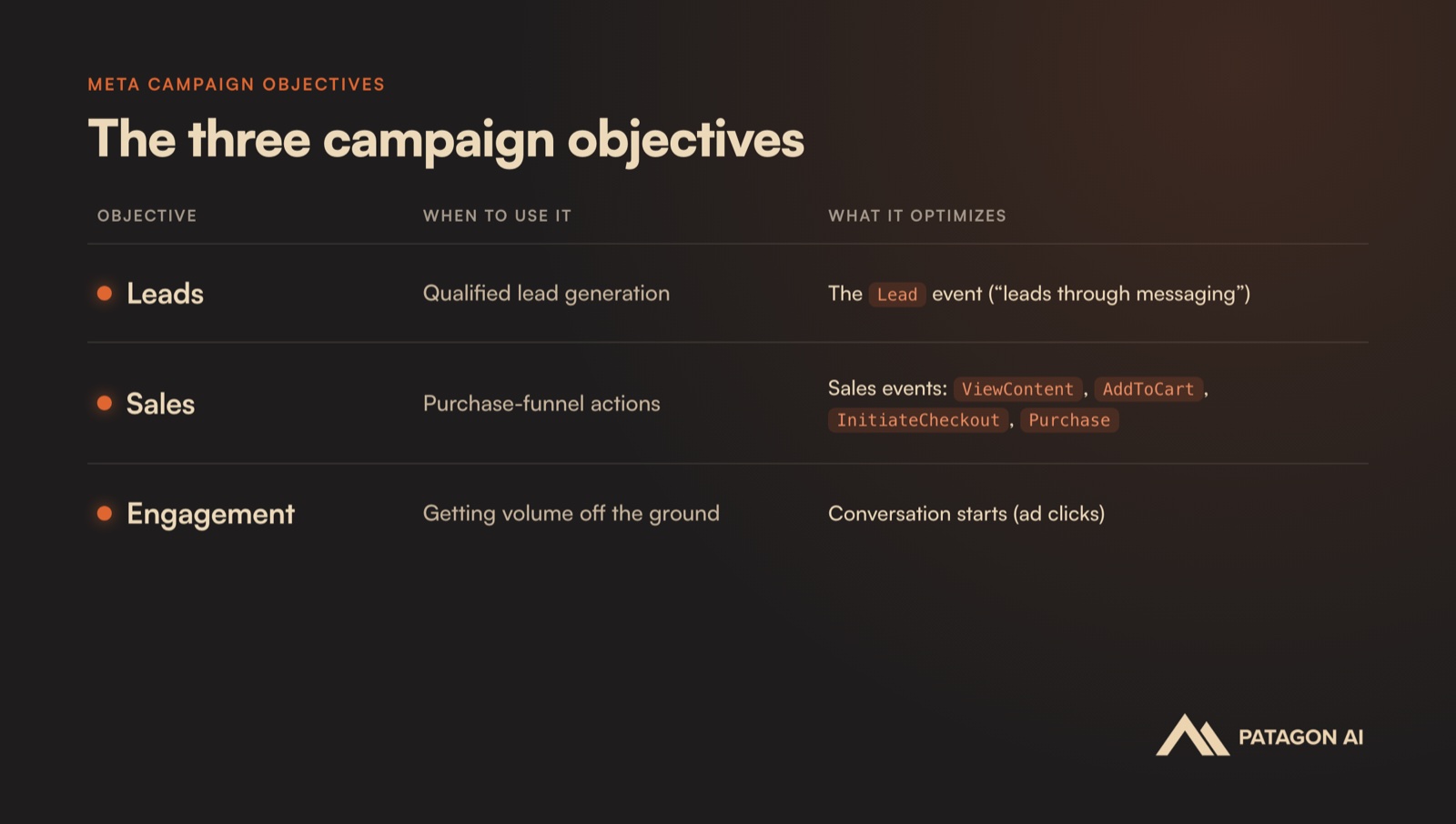
There's a catch that decides which of these you can actually use. Optimizing for Leads or Sales only works if Meta receives the conversion events that happen after the click, the moment a chat becomes a qualified lead or a sale. If those events never make it back to Meta, the algorithm has nothing real to optimize toward, so it falls back to what it can see: conversation starts. That's why so many CTWA advertisers quietly end up on Engagement, paying for people who open a chat rather than for the leads and sales that move the business.
There's a volume requirement on top of that. Meta's algorithm needs roughly 30 of these conversion events per week to leave its learning phase and reliably optimize for the outcome you care about. Below that, the optimization stays noisy and your costs swing from week to week. If you're not there yet, it's reasonable to start on Engagement to build volume, then switch to Leads or Sales once enough conversion events are flowing. Everything that follows is about capturing and sending those events, because that is what makes Leads and Sales optimization possible in the first place.
How to set up a CTWA campaign, step by step
The setup changes a little depending on whether you want to optimize for qualified leads or for sales actions. Both flows live in Meta's campaign creator, and both can feed their conversions back into attribution. Here's each one.
Build a Leads campaign
Use this when your goal is qualified conversations on WhatsApp.
1. Create the campaign. Choose the Leads objective.

2. Configure the ad set. Set the conversion location to WhatsApp, choose your performance goal (maximizing the number of leads needs at least 10 Lead events before it kicks in), and select the Facebook Page and the WhatsApp number the chat should open.

3. Publish. Add your budget and your conversation templates, the opening messages that greet people the moment they land in the chat.
Build a Sales campaign
Use this when you're optimizing for purchase-funnel actions further down the funnel rather than for lead volume.
1. Create the campaign. Choose the Sales objective.

2. Set the conversion location. Choose Message destinations, then select WhatsApp as the place people land in.

3. Set the performance goal. For most sales campaigns this is "maximize number of conversions."

4. Select the dataset and conversion event. Sales conversions use the business_messaging dataset. Pick the sales event you want to optimize for, such as AddToCart or Purchase.

5. Publish. Add your budget and conversation templates, the same way you would for a Leads campaign.
The problem nobody talks about: you can't see what happens after the click
Most CTWA setups leak money at exactly this point. Out of the box, Meta can tell you how many conversations started, but not how many of those conversations became a qualified lead or a booked meeting.
So Meta optimizes for what it can see, which is more conversations. You end up paying for raw volume: chats that never qualify, leads that were never a fit, people who tapped out of curiosity. The algorithm has no way of knowing which of those conversations were actually worth having, so it keeps buying more of all of them.
You can't optimize what you can't measure. And by default, the one thing that matters, the outcome of the conversation, is the one thing Meta never sees.
How to track ROI and attribution on WhatsApp
This is the part that turns CTWA from a volume play into a cost-per-outcome engine.
Start with the click itself. When someone clicks a CTWA ad, Meta automatically tags the click with a ctwa_clid (the Click-to-WhatsApp click ID) that identifies the exact ad that triggered it. Every WhatsApp conversation can be traced back to the ad that produced it, with no UTM parameters or manual tracking links to maintain.
Those conversions don't flow into your normal web pixel. They go to Meta's business_messaging dataset, a separate pixel built specifically for messaging conversions, and wiring that dataset correctly (as shown in the Sales setup above) is what makes attribution work in the first place.
The real payoff comes from sending those qualified-lead conversions back to Meta through its Conversions API. Instead of reporting that a conversation started, you report that a conversation became a qualified lead. Now Meta can optimize toward the leads that genuinely qualify, and your cost per qualified lead (your MQL CPA) comes down over the following weeks.
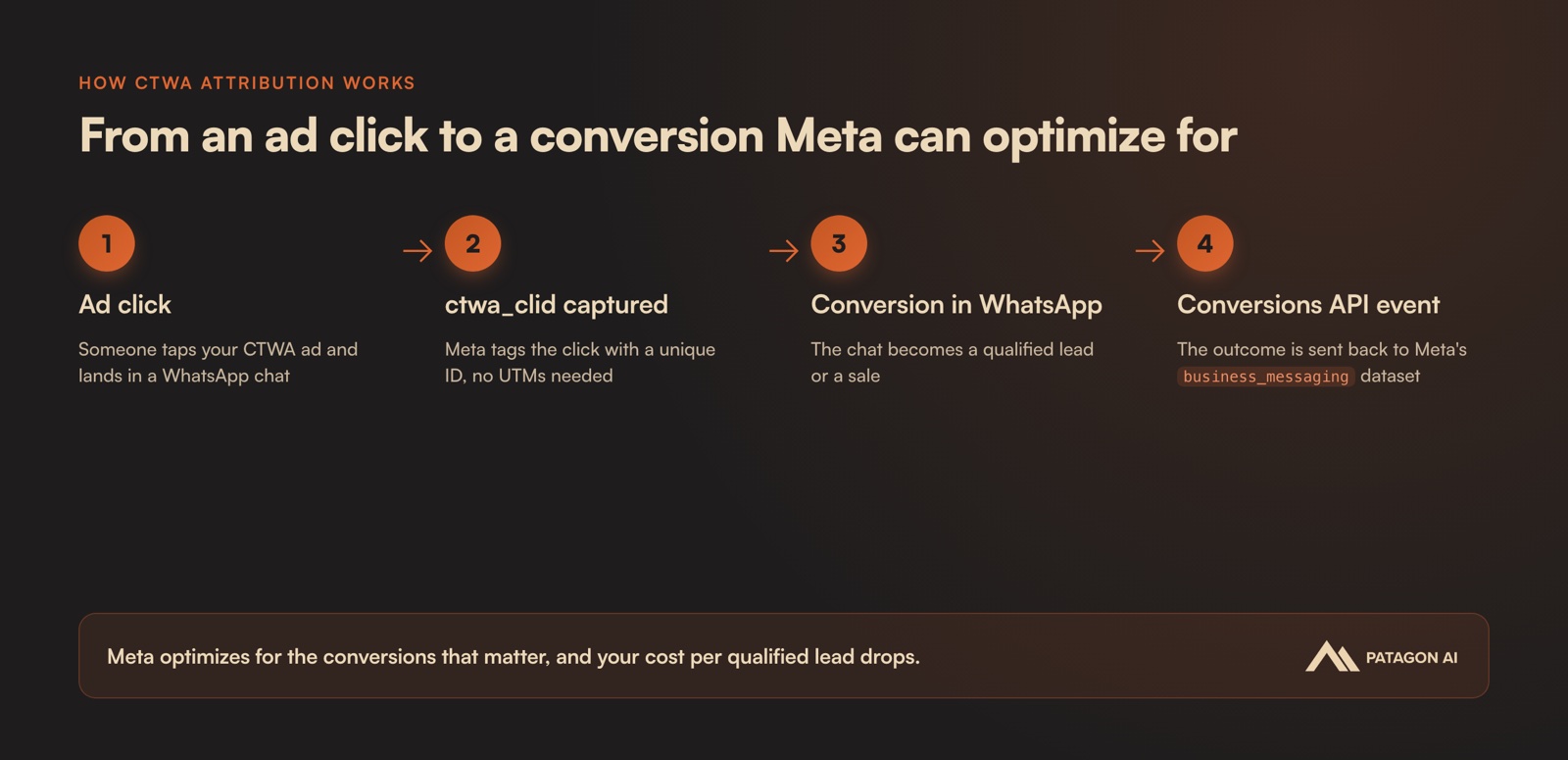
The loop looks like this: an ad click becomes a chat, the chat gets qualified, the qualified outcome goes back to Meta, and Meta sends you better traffic the next time around. Every cycle, the algorithm gets sharper about who sees your ads. This is the attribution layer Patagon AI is built around, tying every WhatsApp chat to its source and feeding qualified outcomes back to the ad platforms. It's how customers have cut CAC by as much as 68% while lifting qualified-lead conversion by 50%.
Frequently asked questions
What does CTWA stand for?
CTWA stands for Click to WhatsApp Ads, Meta ads on Facebook and Instagram that open a WhatsApp conversation directly instead of linking to a website.
Do I need UTM parameters to track Click to WhatsApp Ads?
No. CTWA clicks are automatically tagged with a ctwa_clid that identifies the exact ad that triggered the click, so conversations can be attributed to their source without UTMs.
How do I measure the ROI of WhatsApp ads?
Send qualified-lead and sale conversions back to Meta's business_messaging dataset. You'll see which conversations turned into real outcomes, and Meta can optimize for qualified leads instead of raw conversation volume.
Should I use the Leads or Engagement objective?
Use Leads when you want qualified conversations and already have enough conversion volume for Meta to optimize on. Use Engagement as a fallback to build volume until you reach roughly 30 conversions per week.
Ready to measure what actually matters?
Running Click to WhatsApp Ads is the easy part. Knowing which conversations are worth paying for is the hard part, and it decides whether the whole channel makes you money.
Patagon AI ties every WhatsApp conversation back to the ad that created it, qualifies leads automatically, and feeds those outcomes back to Meta so your cost per qualified lead keeps falling.
Book a meeting to see how the attribution loop performs on your own campaigns.